Wednesday, December 19, 2012

Android Project Ant Build, and put the version in the release file

When you created one project using the eclipse android project, by default you can only build the project, export as APK through the eclipse menu.

Ant is another powerful build tool. you can convert the android project to a ant build target. then just run ant release to build the apk. here is one demo,
Give one project called FrameworkDemo
image

run android update project –p . , it will create one ant build.xml file
image

run ant release, it will create one apk under the bin file,
image

you can put the key information to the ant. properties, like
image

how ever, if you want the release file to be called projectname-youversion-release.apk, ( you can get the version from the AndroidManifest.xml

here is one quick fix. change build xml under platform/tools/ant
Add a target to extract the version informatino,
image
then reference this version
image
Now build again,
image
you can see the version in the file name.

Friday, December 14, 2012

Insert via batch_mutate using Aquiles, Delete, insert again - result is empty

Problem,

using C# Cassandra Client Aquiles to insert some data to cassandra, then delete it using the cassandra CLI. after that insert the same data back again, result is empty.

C# code,

using Apache.Cassandra;
using Aquiles.Cassandra10;
using Aquiles.Core.Cluster;
using Aquiles.Helpers;
using Aquiles.Helpers.Encoders;
using System;
using System.Collections.Generic;
using System.Linq;
using System.Text;
using System.Threading.Tasks;
using CassandraClient = Apache.Cassandra.Cassandra.Client;

namespace CSharpClient
{
    class Program
    {
        static void Main(string[] args)
        {
            new Program().PopulateDataWithBatchMutate();
            Console.WriteLine("Finished");

        }

        private const string CLUSTERNAME = "Test Cluster";
        private const string KEYSPACENAME = "exampleKeyspace";
        private const string COLUMNFAMILYNAME = "exampleCF";

        private void PopulateDataWithBatchMutate()
        {
            Dictionary<byte[], Dictionary<string, List<Mutation>>> mutation_map = new Dictionary<byte[], Dictionary<string, List<Mutation>>>();
            for (long i = 0; i < 1; i++)
            {
                byte[] key = ByteEncoderHelper.LongEncoder.ToByteArray(i);
                Dictionary<string, List<Mutation>> cfMutation = new Dictionary<string, List<Mutation>>();
                List<Mutation> mutationList = new List<Mutation>();
                for (long j = 0; j < 2; j++)
                {
                    string columnName = String.Format("Data-{0:0000000000}", j);
                    Mutation mutation = new Mutation()
                    {
                        Column_or_supercolumn = new ColumnOrSuperColumn()
                        {
                            Column = new Column()
                            {
                                Name = ByteEncoderHelper.UTF8Encoder.ToByteArray(columnName),
                                   Timestamp = UnixHelper.UnixTimestamp,
                                 Value = ByteEncoderHelper.LongEncoder.ToByteArray(j),
                            },
                        },
                    };
                    mutationList.Add(mutation);
                }
                cfMutation.Add(COLUMNFAMILYNAME, mutationList);
                mutation_map.Add(key, cfMutation);
            }

            ICluster cluster = AquilesHelper.RetrieveCluster(CLUSTERNAME);
            cluster.Execute(new ExecutionBlock(delegate(CassandraClient client)
            {
                client.batch_mutate(mutation_map, ConsistencyLevel.ONE);
                return null;
            }), KEYSPACENAME);
        }
    }
}

     1st insert,
        Data is there,
image

     then delete this row manually via cli, data is deleted, no problem so far.
image

then run the code again to do another insert for same data.( STILL NO DATA. that’s the problem.)
image

Why?
C# get incorrect timestamp, which is always older then the correct cassandra. so older insertion will always be ignored once there is one newer delete.

change the timestamp to the following code, will fix this issue.
image

Wednesday, December 12, 2012

How to, installation of Ganglia and setup Hadoop integration

Ganglia has three pieces, Gmond/Gmetad/Gweb, as you search ganglia using yum, you may see those 3 components.

image

Gmond is the monitoring Agent, collecting data and persist it (need to be deployed to every server that we monitor.)

So yum install ganglia-gmond.
 
in the /etc/gmond.conf, you can see the cluster name, change it to your cluster name, I will pickup the sameone like hadoop cluster.

also it has some configuration about the multi-cast ( basically, monitoring agent using multi-cast to make the data replicated on each node. so every node  could ansewer all the query request for each server in the same cluseter.) like the typically share-nothing cluster. each node also listens one tcp port.
that’s it. after that we can start the gmond daemon.

run gmond –t (show the current configuration.)

Gmetad daemon aggregates monitroing data from the clusters. and persit the data using the rrdtool.


so you may need 1+ nodes to do the HA. yum install ganglia-gmetad

for the gmetad configuration, just add the data_source, point to one of the Gmond node
then the config like wheter to store the rrdtool. by default it’s under /var/lib/ganglia/rrds
then gmetad will begin collect data. you can check the folder to see wheter data got collected.


the last one is the gweb, as the name implies, it’s a web interface for the end user to see the charts. basically it’s a standard PHP application using the php-gd module to generate some dynamic charts.

yum install ganglia-gweb will download all the php files. and it’s under /usr/share/ganglia by default.

chose you fav. application, I will use the httpd, and just copy the files to the html root ,for me will be /var/www/html

you need fix the conf.php mappting to /etc/ganglia/conf.php
image

you need tell the web where is the data located ( the data gmetad aggreateed) then that’s it.

then you can see http://webserver/ganglia to see the charts.

for the hadoop/hbase, just change the  hadoop-metrics.properties under the hadoop conf folder.

point the class to gangliacontext and remember to setup the server to the muliticast ip instead of localhost , anotherwise, no data will be collected if you use the default gmond mulit-cast mode

image

then you can see it in the ganglia console, like the metrics of the hadoop

image

Thursday, November 29, 2012

How to: invoke C# generic method dynamically

Here is the sample code I figure out,

using System;

namespace X
{
    class Program
    {
        static void Main(string[] args)
        {
            string byString = "Today"; //or tomorow

            var GenericType = Type.GetType("X." + byString);
            var GenericIns = Activator.CreateInstance(GenericType);

            var genericMethod = typeof(Program).GetMethod("GetList")
                .MakeGenericMethod(GenericType);

            var output = genericMethod.Invoke(null, new object[] { GenericIns });


        }

        public static T GetList<T>(T input) where T : new()
        {
            Console.WriteLine("Invoked " + input);
            return input;
        }
    }

    class Today
    {
    }

    class Tomorrow
    {
    }
}

Wednesday, November 21, 2012

asp.net , Request.Url differs between .net versions with Load balancer

Got a weird problem, here is the quick story. I have several Web servers with the web app binding to private port 8011. the Load balancer has a Name like LB. when the page display the request Uri. it returns very weird format.  http://LB:8081 (so basically, LB name + Private Port) , no body can access this Url.

To do the simple test. I setup one test page on IIS with port8011, return the current URL.
image

then try access using the private url, it’s ok

image

However, if I setup one LB with LB_NAME, and LISTEN on Port 8888. then I try access the LB address. get unreachable url.
image

then I check the code, for .net 4.0. it has the option to follow the Url  from the user request. add one setting called aspnet:UseHostHeaderForRequestUrl
image

then we get the url as user sent in the request
image

If you check the .net 4.0 code, it has the following logic to get URL.

image

code to get new settings,
image


But this only applies to .net fx with latest patch. so check the code using reflector in your real case.

Wednesday, November 7, 2012

Google Tag Manager tutorial.

As the name says, it’s a tag manager offered by Google for free. Here is one basically tutorial show you what it can do, what kind of benefit it can bring to your table.

Basic Idea, you just Insert one google tag manager script to your website, then From the google tag manager console, you can push to deploy different other scripts. like anlaytics tagging, even a customized html , or javascript, img tag.

So first sign up for a account, create one container, get the script you need to inject to your website, try insert the script after <body> tag. if you insert it to blogger, parse the special tags, like & to &amp;

image

Then time to create some tags and test to see the tags on your website. 
  we create one tag to inject the firstaccess cookie to record the first time user hit the web site,
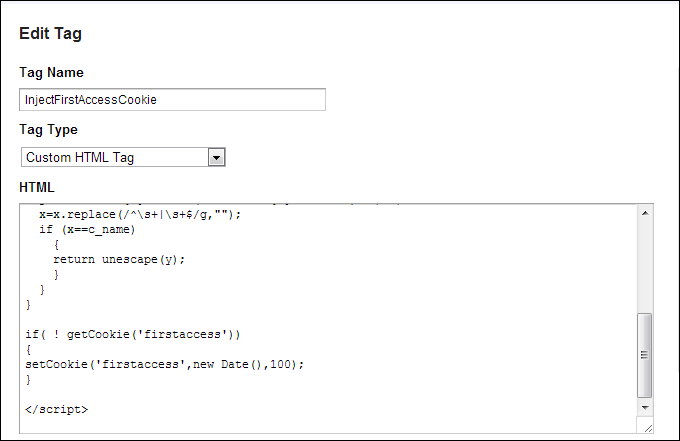
image

for the rules, we applied to all pages.

that’s for tag creating process, now we need to publish this tags.
Click the create version button,
image
it will create one new version with all the current tags,
in each version , you can click save and publish. or SaveandPreview.

savepreview give us change to make sure tags executed. so we click the save and preview mode.
you may see the msg telling you you are in the preview and debug mode. yes, we are!

Now go you your website,
a window will popoup showing you which tag get executed, for me, the inject cookie one.
image

once confirmed ok, exit the preview mode and publish it.
now, go to my web page, you can see we have the firstaccess cookie is there, we injected successfully.
here is the code for your reference,

<script>
function setCookie(c_name,value,exdays)
{
var exdate=new Date();
exdate.setDate(exdate.getDate() + exdays);
var c_value=escape(value) + ((exdays==null) ? "" : "; expires="+exdate.toUTCString());
document.cookie=c_name + "=" + c_value;
}

function getCookie(c_name)
{
var i,x,y,ARRcookies=document.cookie.split(";");
for (i=0;i<ARRcookies.length;i++)
{
  x=ARRcookies[i].substr(0,ARRcookies[i].indexOf("="));
  y=ARRcookies[i].substr(ARRcookies[i].indexOf("=")+1);
  x=x.replace(/^\s+|\s+$/g,"");
  if (x==c_name)
    {
    return unescape(y);
    }
  }
}

if( ! getCookie('firstaccess'))
{
setCookie('firstaccess',new Date(),100);
}

</script>

Friday, October 5, 2012

Ubuntu /centos virtual machine doesn't have IP address/ can't connect to network?

you may turn on the NAT/Bridget/HOST ONly setting for your GUEST OS, but when you run the ifoncfig, there is no IP v4 address associated.
image

Basically, make sure on the HOST machine, the vmware/virtualbox DHCP service are running,
image
then run dhclient eth0, you should be able to get a IPv4 address.

for the windows host machine, the dhcp range are stored in the registry. so make sure the VMnet NIC ip address match the network address, otherwise, from the host machine, you can’t ping or access the guest OS.

image

 
Locations of visitors to this page