After we installed the Solr 1.4 , we use use the solrj as the library Client integration with Solr by using SolrJ .
the latest version of solr is 1.4.x, however, if you want to use the C# client SolrSharp which has not been update sine late 2007. you might need to change something to make the client works with the new version of Solr. say 1.4.
the first exception is called Object reference not set to an instance of an object.
here is one basic snippet to upload one document to solr server via solrsharp. in this example, My solr server is listening on 9999 port. and I started the tcptrace which listens on 8888 and forward all traffic to localhost 9999. based on this, we can see the raw traffic between client and solr server.
using System;
using System.Collections.Generic;
using System.Linq;
using System.Text;
using org.apache.solr.SolrSharp.Configuration;
using org.apache.solr.SolrSharp.Update;
using org.apache.solr.SolrSharp.Indexing;
namespace ConsoleApplication6
{
class TestSolrSharp
{
public static void Main()
{
//upload document
try
{
SolrSearcher solrSearcher = new SolrSearcher("http://localhost:8888/solr", Mode.ReadWrite);
SolrUpdater update = new SolrUpdater(solrSearcher);
UpdateIndexDocument doc = new UpdateIndexDocument();
doc.Add("id", "1");
doc.Add("title", "test solr");
update.PostToIndex(doc, true);
}
catch (Exception ex)
{
Console.WriteLine(ex.Message);
}
}
}
}
|
When I run it , I get the following error.
| System.NullReferenceException: Object reference not set to an instance of an object.
at org.apache.solr.SolrSharp.Configuration.Schema.SolrSchema..ctor(SolrSearcher solrSearcher) in C:\Users\xx\Downloads\solrsharp-Dec-30-2007\src\Configuration\Schema\SolrSchema.cs:line 76
at org.apache.solr.SolrSharp.Configuration.SolrSearcher.SetSolrSchema() in C:\Users\xx\Downloads\solrshar
p-Dec-30-2007\src\Configuration\SolrSearcher.cs:line 93
at org.apache.solr.SolrSharp.Configuration.SolrSearcher..ctor(String solrUrl, Mode searcherMode) in C:\Users\xx\Downloads\solrsharp-Dec-30-2007\src\Configuration\SolrSearcher.cs:line 77
at ConsoleApplication6.TestSolrSharp.Main() in C:\Users\xx\documents\visual studio 2010\Projects\ConsoleA
pplication6\ConsoleApplication6\Class1.cs:line 18
Press any key to continue . . . |
then I check the tcptrace traffic, get the access exception.
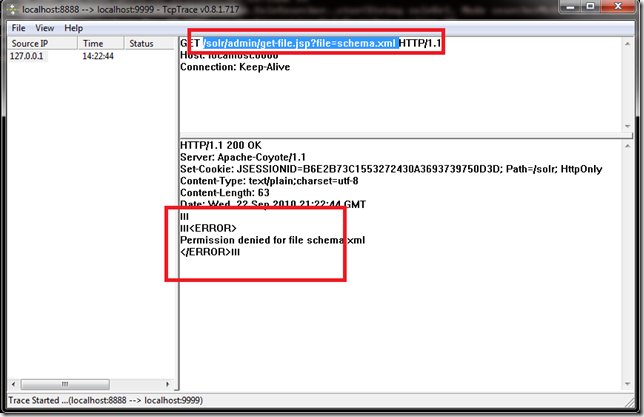
it looks like the client library will first pull the Scheme.xml of solr. When it try to get the schema.xml from /solr/admin/get-file.jsp?file=schema.xml, the solr server returns error of No Access.
So we need to make sure http://localhost:9999/solr/admin/get-file.jsp?file=schema.xml is accessible. Why we dont’t have access at this time.
Let’s check the soure code of the get-file.jsp, as shown in the bellow.
| <%@ page contentType="text/plain; charset=utf-8" pageEncoding="UTF-8" %>
<%--
Licensed to the Apache Software Foundation (ASF) under one or more
contributor license agreements. See the NOTICE file distributed with
this work for additional information regarding copyright ownership.
The ASF licenses this file to You under the Apache License, Version 2.0
(the "License"); you may not use this file except in compliance with
the License. You may obtain a copy of the License at http://www.apache.org/licenses/LICENSE-2.0 Unless required by applicable law or agreed to in writing, software
distributed under the License is distributed on an "AS IS" BASIS,
WITHOUT WARRANTIES OR CONDITIONS OF ANY KIND, either express or implied.
See the License for the specific language governing permissions and
limitations under the License.
--%>
<%@ page import="org.apache.solr.core.Config,
org.apache.solr.core.SolrCore,
org.apache.solr.core.SolrConfig,
java.io.InputStream,
java.io.InputStreamReader,
java.io.Reader,
java.util.StringTokenizer,
java.util.logging.Logger"%>
<%!
static Logger log = Logger.getLogger(SolrCore.class.getName());
%>
<%
// NOTE -- this file will be removed in a future release
log.warning("Using deprecated JSP: " + request.getRequestURL().append("?").append(request.getQueryString()) + " -- check the ShowFileRequestHandler" ); Object ocore = request.getAttribute("org.apache.solr.SolrCore");
SolrCore core = ocore instanceof SolrCore? (SolrCore) ocore : SolrCore.getSolrCore();
String fname = request.getParameter("file");
String optional = request.getParameter("optional");
String gettableFiles = core.getSolrConfig().get("admin/gettableFiles","");
StringTokenizer st = new StringTokenizer(gettableFiles);
InputStream is;
boolean isValid = false;
boolean isOptional = false;
if (fname != null) {
// Validate fname
while(st.hasMoreTokens()) {
if (st.nextToken().compareTo(fname) == 0) isValid = true;
}
}
if (optional!=null && optional.equalsIgnoreCase("y")) {
isOptional=true;
}
if (isValid) {
try {
is= core.getSolrConfig().openResource(fname);
Reader input = new InputStreamReader(is);
char[] buf = new char[4096];
while (true) {
int len = input.read(buf);
if (len<=0) break;
out.write(buf,0,len);
}
}
catch (RuntimeException re) {
if (!isOptional) {
throw re;
}
}
} else {
out.println("<ERROR>");
out.println("Permission denied for file "+ fname);
out.println("</ERROR>");
}
%> |
from the code, it will check the configuration of gettablefiles in solrconfig.config by default, there is no such configration in the solrconfig.xml (which comes with the new verson), so it means those files are not getable by default. Why?
the newer version expose this file get functionality via another url called /admin/file?
which is configed in solrconfigxml
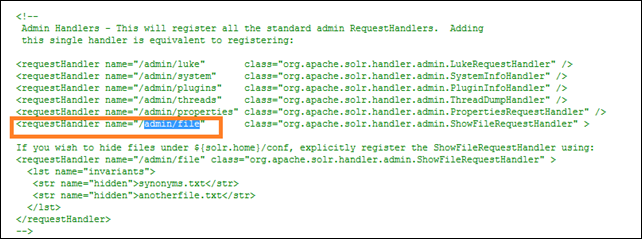
we get the answer , so fix is easy. just put one more entry in the admin section of solrconfig.xml, rememer to restart solr also.

Now we can use the solrsharp to upload some documents to solr.

For more information.


