Friday, October 5, 2012

Ubuntu /centos virtual machine doesn't have IP address/ can't connect to network?

you may turn on the NAT/Bridget/HOST ONly setting for your GUEST OS, but when you run the ifoncfig, there is no IP v4 address associated.
image

Basically, make sure on the HOST machine, the vmware/virtualbox DHCP service are running,
image
then run dhclient eth0, you should be able to get a IPv4 address.

for the windows host machine, the dhcp range are stored in the registry. so make sure the VMnet NIC ip address match the network address, otherwise, from the host machine, you can’t ping or access the guest OS.

image

Thursday, October 4, 2012

asp.net output cache not working? and the same code works on some servers? why

Here is one very typical issue that bring you to this blog.
Issues, I have one asp.net application with nothing special, for the performance consideration, we turn on the output cache. somehow, the same page never got cached on some servers, and It did cached on most servers. of vice versa.

short answer, It has nothing to be with the IIS Version. It’s All about HTTP Cookies and .net Framework version.  Let’s put a very basic Page.

just turn on the output cache using the most simple way,
image

for the code, we just send out some cookie,
image

Let’s start from some server that it works,
1st time you hit the url, get a initial access time.

image

  and cookie was sent to client from server side,
image

try again, this page will be cached. you are always see the page, you are 1st time here,
image

Why? because we setup the page need to be cached for 600 seconds, and cache response vary by any params, if we add something to the url parameter, we wills see refreshed page,
image

that’s the end of this cache working story, if we deploy the same code to another server, results are totally different.
1st time,
image

retry,
image

Why? I did a lot check, and find out the reason is simple. IT’S BECAUSE OF THE .NET FRAMEWORK VERSION.

In earlier verison of the FX, if you check the ouputCacheModule , it will cache response without checking the cookie value, that means even response has a server side cookie, it will still cache the response.
image

But for newer version, it will simply ignore the cache insert if response has cookie associated.
 image

my old version is, .4209, it never check cookie when cache response. that means you may see other people’s response (like login name?)
image
new version,.5456, it will check cookie which is more safe.
image

Hope it helps.

Wednesday, October 3, 2012

How to test RamDisk /Ram disk on centos

It turns out super easy to setup one RAM disk on centos, since linux 2.4 and beyond has the built-in support for ramdisk.

when you check the /dev/ram*, you may see a lot virtual RAM devices.
image

by default the ram device is very small, could be just less than 100Mb, so first step is always incresing the ramdisk size, to do so, append the ramdisk_size=numberofKBs to the boot config /etc/grub.conf

image

restart the server to make it refresh the changes.
now, let me create one fs first on /dev/ram1, mke2fs –m 0 /dev/ram1

image

then create one folder, and map the disk to this folder,
image

however, the ramdisk and data can’t survive the reboot, so you may put some script under rc.local to load the ramdisk and data.

run some basic testing,
image

Friday, September 28, 2012

How to capture network traffic through command line in C#

Wireshark is a GUI tool which enable us to click and capture network traffic. if you are IT admin guy, you may want something like tcpdump in linux. actually, bundled with the wireshark installation, there is one tool called tshark.exe

image

you can run tshark –D to list all the NIC interfaces,
image

If you want to see traffic for interface 4,using the –i command

image

for me , I just wondering to know which app is trying to send out some http traffic,
image
once found it, love it!

Thursday, September 27, 2012

Cassandra DSE, Testing Solr integration

SOLR support is one of the DataStax commercial offering for cassandra. which basically enable us to run a real-time solr query against the data in the cassandra. Here is one basic try of the features.

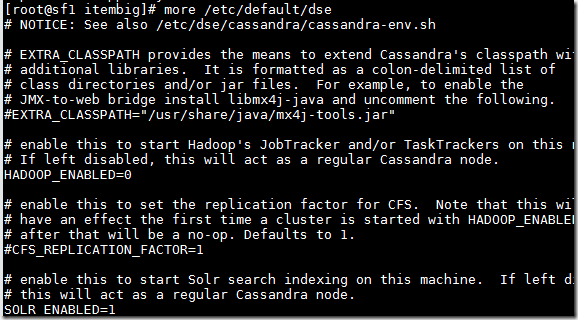
when you create the DSE cluster, you can change some node by setting the /etc/default/dse enable hadoop or Solr.
Change the SOLR_ENABLED or HADOOP_ENABLED one will add one more role to that Cassandra node.
image

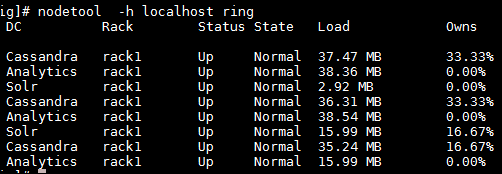
For me, I have 8 Nodes as a whole cluster. 3 as regular cassandra, 3 as Hadoop node, 2 as SOLR, you can see fro the ops center view. or just through node tool.
image

image

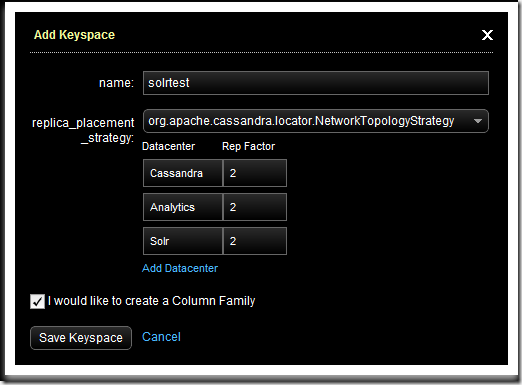
Now Let’s create one KS called solrtest first through the OPscenter admin ui,
image

And create one column family called info using Cqlsh. and load some data.

image

DSE has some default mapping between the data stored in cassandra, and data needed to be indexed to SOLR.
image

By default, Nodes will be mapped to Shard. for my case, I have 2 Solr nodes, that means I have 2 Solr Shards. CF will be mapped to Core, so here I need to tell the system I want to index info column family.  for columns in that CF, will be mapped to solr field. we can pick which columns need to be indexed throught some level of configration called schema.xml which is the same file in SOLR.

in the /usr/share/dse-demo/wikipedia , there are some sample schemas and script.
  we change the schema.xml first, basically we just need two fields to be indexed, and default search field is comments,
image

then we need post his xml to SOLR, here is one script called 1-add-schema.sh
image

change the mapping url, shoul http://ANYSOLRNODE:8983/solr/resource/KEYSPACE.CF/solrconfig.xml

then we run the script to post the schema, and config file. (you are only need run this for one solr server, the solr server shared those configuration.)

after done, you can access.
http://ANYSOlrServer:8983/solr/KEYSPACE.CF/admin/ to see the solr admin ui,
image

when you run search, you can see the docs returned as expected.
image

if we change the query to comments:hello, then only first doc will be returned
image

If we insert more data, those data will be indexed on the fly.
image
search solr, 2 docs returned.

image

At the same time, you can use the CQL to query the data using solr syntax.
image

So that’s it. you may wondering what happened underneath when we run this query?

basically it will query all SOLR Nodes to run a distrubuted shared query, get the items key, and pull the data from cassandra.

Friday, September 14, 2012

R data mining IDE, rattle tutorial

Besides the Rcmdr IDE, Rattle is another one IDE for me to do interactive data minding or just data discovery.
installation is easy, just install rattle library, then load the library , and click yes to install the prerequisites components.

image

once done, run rattle() to load the Rattle IDE.

image

like the Rcmdr, you can load/import data. then you can explore the data. Always remember to click Execute to make it happen.
since it’s used for modeling also, you can specify which column is primary key(ident here,) which one is the response value here it is called Target.
image

then click explore tab, to do more exploring. like a summary.

image

click distribution, you can do some plotting.

image

in the correlation, you can tell which variable are correlated to others, blue means positive.

for the sample data, of course, revenue is correlated with request, impression and clicks.
has no relationship with fill_rate.
imagef

for the interactive , you can use plot builder to do a lot plotting. rember to install JDK and rJava library.
image

here is one cool bubble plot,
image

Also you can run transform, clustering.

R data minding package , Rcmdr tutorial/setup guide

being using the RStudio for a while , RStudio is a great IDE for R programmers, you need remember all the function/parameters. For the c# programmers, RStudio is just like the Visual Studio which has a great support for intellisense, IDE. project workspace, Version control. Rcmdr is a great Visual GUI tools for data mining, even for  just plotting/graphics. here is one basic tutorial,

Install Rcmdr, basically just click RStudio or Any R IDE, or just R command, try install package ‘Rcmdr’
image

once done, you can run library(Rcmdr) to startup the IDE, you may be prompted to install some components , just click yes to GO.

image

once done, you will see a new IDE, Rcmdr which has more menus.
image

basically, you can use the Data menu to import data from external data sources, or load data in packages, and run some data processing, like convert numbers to factors, or get a subset data
after data was loaded, you can view/edit the data, also from the script window, you can see the genrated R script,
image

Now, let’s run some basic plotting, select Graphics menu,->histogram, you will be asked to chose the varible to plot based on existing dataset.
image

Click OK, the graphics will be shown on IDE hosted the R, here will be Rstudio for me.
image

you can click statistics to create one Model like LInear model, or do some dimentional analysis

one you get the model, you can click models to visualize it.
image

 
Locations of visitors to this page