I just followed the instruction on http://tomcat.apache.org/connectors-doc/reference/iis.html.
Installed one Tomcat 7 Instance, with all the default setting, then startup the instance by run “bin\startup.bat”
Download and Install the Mod_JK for IIS module from http://www.apache.org/dist/tomcat/tomcat-connectors/jk/binaries/, please pay attention if you are using the 64 bit windows ,please chose the 64 bit ISAP extension, otherwise IIS will ignore the extension.
then make worker.properties and uriworkermap.properties files. they are pretty simple. forward all the url like /docs to the tomcat help.
#Woker.Properties
worker.list=tomcat1,jkstatus
worker.tomcat1.cachesize=10
worker.tomcat1.host=127.0.0.1
worker.tomcat1.port=8009
worker.tomcat1.type=ajp13
worker.jkstatus.type=status
uriworkermap.properties
/docs=tomcat1
/docs/*=tomcat1
/status=jkstatus |
Since I am using IIS 7.5 ( the one comes with windows 7), I have to enable the IIS extension features. they are disabled by default.

after Done, Open the IIS manager, enable the ISAPI extension. (go to default site, Http Handlers mappings, Click add wildcard script map in the right action panel. )

then create one virtual directly called jakarta. and point to the directory that contains the isapi_redirect dll.
>>> this is important, later on we will config the registry to point the extension_url to /jakarta/isapi_redirect_xxx.dll
Now, fill out those defautl configurations in registry. you may just save and import the following setting, Change and apply your folder path.
| Windows Registry Editor Version 5.00 [HKEY_LOCAL_MACHINE\SOFTWARE\Apache Software Foundation\Jakarta Isapi Redirector\1.0]
"log_file"="C:\\apache-tomcat-7.0.0\\IIS\\redirector.log"
"log_level"="debug"
"worker_file"="C:\\apache-tomcat-7.0.0\\IIS\\workers.properties"
"worker_mount_file"="C:\\apache-tomcat-7.0.0\\IIS\\uriworkermap.properties"
"extension_uri"="/jakarta/isapi_redirect-64.dll"
"strip_session"="1"
"reject_unsafe"="1" |

then run “IISReset” to refresh the changes.
after that, it’s time to test the drive. when I enter “http://localhost/docs”, nothing appears. just a blank screen , no errors.

what happened under the Neath? then I open the redirect_log, here is the log I get.
I highlighted some parts, looks like the config did get picked up, the tomcat1 worker is right. the communication is good.
| [Wed Aug 25 10:30:06.871 2010] [3868:5124] [debug] jk_set_time_fmt::jk_util.c (459): Pre-processed log time stamp format is '[%a %b %d %H:%M:%S.000 %Y] '
[Wed Aug 25 10:30:06.881 2010] [3868:5124] [info] init_jk::jk_isapi_plugin.c (2403): Starting Jakarta/ISAPI/isapi_redirector/1.2.30
[Wed Aug 25 10:30:06.884 2010] [3868:5124] [debug] init_jk::jk_isapi_plugin.c (2421): Detected IIS version 7.5
[Wed Aug 25 10:30:06.887 2010] [3868:5124] [debug] init_jk::jk_isapi_plugin.c (2426): Using registry.
[Wed Aug 25 10:30:06.890 2010] [3868:5124] [debug] init_jk::jk_isapi_plugin.c (2429): Using log file C:\apache-tomcat-7.0.0\IIS\redirector.log.
[Wed Aug 25 10:30:06.894 2010] [3868:5124] [debug] init_jk::jk_isapi_plugin.c (2430): Using log level 1.
[Wed Aug 25 10:30:06.897 2010] [3868:5124] [debug] init_jk::jk_isapi_plugin.c (2431): Using extension uri /jakarta/isapi_redirect-64.dll.
[Wed Aug 25 10:30:06.900 2010] [3868:5124] [debug] init_jk::jk_isapi_plugin.c (2432): Using worker file C:\apache-tomcat-7.0.0\IIS\workers.properties.
[Wed Aug 25 10:30:06.902 2010] [3868:5124] [debug] init_jk::jk_isapi_plugin.c (2433): Using worker mount file C:\apache-tomcat-7.0.0\IIS\uriworkermap.properties.
[Wed Aug 25 10:30:06.905 2010] [3868:5124] [debug] init_jk::jk_isapi_plugin.c (2435): Using rewrite rule file .
[Wed Aug 25 10:30:06.908 2010] [3868:5124] [debug] init_jk::jk_isapi_plugin.c (2437): Using uri select 3.
[Wed Aug 25 10:30:06.911 2010] [3868:5124] [debug] init_jk::jk_isapi_plugin.c (2438): Using no chunked encoding.
[Wed Aug 25 10:30:06.912 2010] [3868:5124] [debug] init_jk::jk_isapi_plugin.c (2440): Using notification event SF_NOTIFY_AUTH_COMPLETE (0x04000000)
[Wed Aug 25 10:30:06.915 2010] [3868:5124] [debug] init_jk::jk_isapi_plugin.c (2450): Using uri header TOMCATURI0000000010000000:.
[Wed Aug 25 10:30:06.918 2010] [3868:5124] [debug] init_jk::jk_isapi_plugin.c (2451): Using query header TOMCATQUERY0000000010000000:.
[Wed Aug 25 10:30:06.920 2010] [3868:5124] [debug] init_jk::jk_isapi_plugin.c (2452): Using worker header TOMCATWORKER0000000010000000:.
[Wed Aug 25 10:30:06.922 2010] [3868:5124] [debug] init_jk::jk_isapi_plugin.c (2453): Using worker index TOMCATWORKERIDX0000000010000000:.
[Wed Aug 25 10:30:06.925 2010] [3868:5124] [debug] init_jk::jk_isapi_plugin.c (2454): Using translate header TOMCATTRANSLATE0000000010000000:.
[Wed Aug 25 10:30:06.928 2010] [3868:5124] [debug] init_jk::jk_isapi_plugin.c (2455): Using a default of 250 connections per pool.
[Wed Aug 25 10:30:06.931 2010] [3868:5124] [debug] jk_map_read_property::jk_map.c (491): Adding property '/docs' with value 'tomcat1' to map.
[Wed Aug 25 10:30:06.933 2010] [3868:5124] [debug] jk_map_read_property::jk_map.c (491): Adding property '/docs/*' with value 'tomcat1' to map.
[Wed Aug 25 10:30:06.936 2010] [3868:5124] [debug] jk_map_read_property::jk_map.c (491): Adding property '/status' with value 'jkstatus' to map.
[Wed Aug 25 10:30:06.939 2010] [3868:5124] [debug] uri_worker_map_load::jk_uri_worker_map.c (1102): Loading urimaps from C:\apache-tomcat-7.0.0\IIS\uriworkermap.properties with reload check interval 60 seconds
[Wed Aug 25 10:30:06.941 2010] [3868:5124] [debug] uri_worker_map_add::jk_uri_worker_map.c (729): exact rule '/docs=tomcat1' source 'uriworkermap' was added
[Wed Aug 25 10:30:06.943 2010] [3868:5124] [debug] uri_worker_map_add::jk_uri_worker_map.c (720): wildchar rule '/docs/*=tomcat1' source 'uriworkermap' was added
[Wed Aug 25 10:30:06.946 2010] [3868:5124] [debug] uri_worker_map_add::jk_uri_worker_map.c (729): exact rule '/status=jkstatus' source 'uriworkermap' was added
[Wed Aug 25 10:30:06.951 2010] [3868:5124] [debug] uri_worker_map_dump::jk_uri_worker_map.c (171): uri map dump after file load: index=0 file='C:\apache-tomcat-7.0.0\IIS\uriworkermap.properties' reject_unsafe=1 reload=60 modified=1282755822 checked=1282757406
[Wed Aug 25 10:30:06.954 2010] [3868:5124] [debug] uri_worker_map_dump::jk_uri_worker_map.c (176): generation 0: size=0 nosize=0 capacity=0
[Wed Aug 25 10:30:06.956 2010] [3868:5124] [debug] uri_worker_map_dump::jk_uri_worker_map.c (176): generation 1: size=3 nosize=0 capacity=4
[Wed Aug 25 10:30:06.961 2010] [3868:5124] [debug] uri_worker_map_dump::jk_uri_worker_map.c (186): NEXT (1) map #0: uri=/docs/* worker=tomcat1 context=/docs/* source=uriworkermap type=Wildchar len=7
[Wed Aug 25 10:30:06.964 2010] [3868:5124] [debug] uri_worker_map_dump::jk_uri_worker_map.c (186): NEXT (1) map #1: uri=/status worker=jkstatus context=/status source=uriworkermap type=Exact len=7
[Wed Aug 25 10:30:06.966 2010] [3868:5124] [debug] uri_worker_map_dump::jk_uri_worker_map.c (186): NEXT (1) map #2: uri=/docs worker=tomcat1 context=/docs source=uriworkermap type=Exact len=5
[Wed Aug 25 10:30:06.968 2010] [3868:5124] [debug] jk_map_read_property::jk_map.c (491): Adding property 'worker.list' with value 'tomcat1,jkstatus' to map.
[Wed Aug 25 10:30:06.971 2010] [3868:5124] [warn] jk_map_validate_property::jk_map.c (411): The attribute 'worker.tomcat1.cachesize' is deprecated - please check the documentation for the correct replacement.
[Wed Aug 25 10:30:06.974 2010] [3868:5124] [debug] jk_map_read_property::jk_map.c (491): Adding property 'worker.tomcat1.cachesize' with value '10' to map.
[Wed Aug 25 10:30:06.979 2010] [3868:5124] [debug] jk_map_read_property::jk_map.c (491): Adding property 'worker.tomcat1.host' with value '127.0.0.1' to map.
[Wed Aug 25 10:30:06.980 2010] [3868:5124] [debug] jk_map_read_property::jk_map.c (491): Adding property 'worker.tomcat1.port' with value '8009' to map.
[Wed Aug 25 10:30:06.984 2010] [3868:5124] [debug] jk_map_read_property::jk_map.c (491): Adding property 'worker.tomcat1.type' with value 'ajp13' to map.
[Wed Aug 25 10:30:06.986 2010] [3868:5124] [debug] jk_map_read_property::jk_map.c (491): Adding property 'worker.jkstatus.type' with value 'status' to map.
[Wed Aug 25 10:30:06.988 2010] [3868:5124] [debug] jk_map_resolve_references::jk_map.c (774): Checking for references with prefix worker. with wildcard (recursion 1)
[Wed Aug 25 10:30:06.991 2010] [3868:5124] [debug] jk_shm_calculate_size::jk_shm.c (132): shared memory will contain 1 ajp workers of size 320 and 0 lb workers of size 320 with 0 members of size 384+320
[Wed Aug 25 10:30:06.994 2010] [3868:5124] [debug] jk_shm_open::jk_shm.c (254): Initialized shared memory JKISAPISHMEM_LOCALHOST_1 size=448 free=320 addr=0x3b0000
[Wed Aug 25 10:30:06.997 2010] [3868:5124] [debug] jk_map_dump::jk_map.c (589): Dump of map: 'worker.list' -> 'tomcat1,jkstatus'
[Wed Aug 25 10:30:07.000 2010] [3868:5124] [debug] jk_map_dump::jk_map.c (589): Dump of map: 'worker.tomcat1.cachesize' -> '10'
[Wed Aug 25 10:30:07.002 2010] [3868:5124] [debug] jk_map_dump::jk_map.c (589): Dump of map: 'worker.tomcat1.host' -> '127.0.0.1'
[Wed Aug 25 10:30:07.005 2010] [3868:5124] [debug] jk_map_dump::jk_map.c (589): Dump of map: 'worker.tomcat1.port' -> '8009'
[Wed Aug 25 10:30:07.008 2010] [3868:5124] [debug] jk_map_dump::jk_map.c (589): Dump of map: 'worker.tomcat1.type' -> 'ajp13'
[Wed Aug 25 10:30:07.011 2010] [3868:5124] [debug] jk_map_dump::jk_map.c (589): Dump of map: 'worker.jkstatus.type' -> 'status'
[Wed Aug 25 10:30:07.014 2010] [3868:5124] [debug] build_worker_map::jk_worker.c (242): creating worker tomcat1
[Wed Aug 25 10:30:07.017 2010] [3868:5124] [debug] wc_create_worker::jk_worker.c (146): about to create instance tomcat1 of ajp13
[Wed Aug 25 10:30:07.020 2010] [3868:5124] [debug] wc_create_worker::jk_worker.c (159): about to validate and init tomcat1
[Wed Aug 25 10:30:07.023 2010] [3868:5124] [debug] ajp_validate::jk_ajp_common.c (2605): worker tomcat1 contact is '127.0.0.1:8009'
[Wed Aug 25 10:30:07.027 2010] [3868:5124] [debug] ajp_init::jk_ajp_common.c (2800): setting endpoint options:
[Wed Aug 25 10:30:07.030 2010] [3868:5124] [debug] ajp_init::jk_ajp_common.c (2803): keepalive: 0
[Wed Aug 25 10:30:07.035 2010] [3868:5124] [debug] ajp_init::jk_ajp_common.c (2807): socket timeout: 0
[Wed Aug 25 10:30:07.038 2010] [3868:5124] [debug] ajp_init::jk_ajp_common.c (2811): socket connect timeout: 0
[Wed Aug 25 10:30:07.040 2010] [3868:5124] [debug] ajp_init::jk_ajp_common.c (2815): buffer size: 0
[Wed Aug 25 10:30:07.044 2010] [3868:5124] [debug] ajp_init::jk_ajp_common.c (2819): pool timeout: 0
[Wed Aug 25 10:30:07.047 2010] [3868:5124] [debug] ajp_init::jk_ajp_common.c (2823): ping timeout: 10000
[Wed Aug 25 10:30:07.050 2010] [3868:5124] [debug] ajp_init::jk_ajp_common.c (2827): connect timeout: 0
[Wed Aug 25 10:30:07.053 2010] [3868:5124] [debug] ajp_init::jk_ajp_common.c (2831): reply timeout: 0
[Wed Aug 25 10:30:07.056 2010] [3868:5124] [debug] ajp_init::jk_ajp_common.c (2835): prepost timeout: 0
[Wed Aug 25 10:30:07.059 2010] [3868:5124] [debug] ajp_init::jk_ajp_common.c (2839): recovery options: 0
[Wed Aug 25 10:30:07.062 2010] [3868:5124] [debug] ajp_init::jk_ajp_common.c (2843): retries: 2
[Wed Aug 25 10:30:07.063 2010] [3868:5124] [debug] ajp_init::jk_ajp_common.c (2847): max packet size: 8192
[Wed Aug 25 10:30:07.066 2010] [3868:5124] [debug] ajp_init::jk_ajp_common.c (2851): retry interval: 100
[Wed Aug 25 10:30:07.069 2010] [3868:5124] [debug] ajp_create_endpoint_cache::jk_ajp_common.c (2662): setting connection pool size to 10 with min 5 and acquire timeout 200
[Wed Aug 25 10:30:07.072 2010] [3868:5124] [debug] build_worker_map::jk_worker.c (242): creating worker jkstatus
[Wed Aug 25 10:30:07.075 2010] [3868:5124] [debug] wc_create_worker::jk_worker.c (146): about to create instance jkstatus of status
[Wed Aug 25 10:30:07.078 2010] [3868:5124] [debug] wc_create_worker::jk_worker.c (159): about to validate and init jkstatus
[Wed Aug 25 10:30:07.081 2010] [3868:5124] [debug] init::jk_status.c (5053): Status worker 'jkstatus' is read/write and has css '(null)', prefix 'worker', name space 'jk:', xml name space 'xmlns:jk="http://tomcat.apache.org"', document type '(null)'
[Wed Aug 25 10:30:07.084 2010] [3868:5124] [debug] init::jk_status.c (5104): Status worker 'jkstatus' has good rating for '0000000f' and bad rating for '00ff1010'
[Wed Aug 25 10:30:07.085 2010] [3868:5124] [debug] wc_get_worker_for_name::jk_worker.c (116): found a worker tomcat1
[Wed Aug 25 10:30:07.089 2010] [3868:5124] [debug] wc_get_name_for_type::jk_worker.c (293): Found worker type 'ajp13'
[Wed Aug 25 10:30:07.091 2010] [3868:5124] [debug] uri_worker_map_ext::jk_uri_worker_map.c (512): Checking extension for worker 0: tomcat1 of type ajp13 (2)
[Wed Aug 25 10:30:07.094 2010] [3868:5124] [debug] wc_get_worker_for_name::jk_worker.c (116): found a worker jkstatus
[Wed Aug 25 10:30:07.097 2010] [3868:5124] [debug] wc_get_name_for_type::jk_worker.c (293): Found worker type 'status'
[Wed Aug 25 10:30:07.100 2010] [3868:5124] [debug] uri_worker_map_ext::jk_uri_worker_map.c (512): Checking extension for worker 1: jkstatus of type status (6)
[Wed Aug 25 10:30:07.103 2010] [3868:5124] [debug] wc_get_worker_for_name::jk_worker.c (116): found a worker tomcat1
[Wed Aug 25 10:30:07.106 2010] [3868:5124] [debug] wc_get_name_for_type::jk_worker.c (293): Found worker type 'ajp13'
[Wed Aug 25 10:30:07.109 2010] [3868:5124] [debug] uri_worker_map_ext::jk_uri_worker_map.c (512): Checking extension for worker 2: tomcat1 of type ajp13 (2)
[Wed Aug 25 10:30:07.111 2010] [3868:5124] [debug] uri_worker_map_dump::jk_uri_worker_map.c (171): uri map dump after extension stripping: index=0 file='C:\apache-tomcat-7.0.0\IIS\uriworkermap.properties' reject_unsafe=1 reload=60 modified=1282755822 checked=1282757406
[Wed Aug 25 10:30:07.115 2010] [3868:5124] [debug] uri_worker_map_dump::jk_uri_worker_map.c (176): generation 0: size=0 nosize=0 capacity=0
[Wed Aug 25 10:30:07.117 2010] [3868:5124] [debug] uri_worker_map_dump::jk_uri_worker_map.c (176): generation 1: size=3 nosize=0 capacity=4
[Wed Aug 25 10:30:07.120 2010] [3868:5124] [debug] uri_worker_map_dump::jk_uri_worker_map.c (186): NEXT (1) map #0: uri=/docs/* worker=tomcat1 context=/docs/* source=uriworkermap type=Wildchar len=7
[Wed Aug 25 10:30:07.123 2010] [3868:5124] [debug] uri_worker_map_dump::jk_uri_worker_map.c (186): NEXT (1) map #1: uri=/status worker=jkstatus context=/status source=uriworkermap type=Exact len=7
[Wed Aug 25 10:30:07.126 2010] [3868:5124] [debug] uri_worker_map_dump::jk_uri_worker_map.c (186): NEXT (1) map #2: uri=/docs worker=tomcat1 context=/docs source=uriworkermap type=Exact len=5
[Wed Aug 25 10:30:07.129 2010] [3868:5124] [debug] uri_worker_map_switch::jk_uri_worker_map.c (482): Switching uri worker map from index 0 to index 1
[Wed Aug 25 10:30:07.132 2010] [3868:5124] [info] init_jk::jk_isapi_plugin.c (2573): Jakarta/ISAPI/isapi_redirector/1.2.30 initialized
[Wed Aug 25 10:30:07.135 2010] [3868:5124] [debug] wc_maintain::jk_worker.c (339): Maintaining worker tomcat1
[Wed Aug 25 10:30:07.137 2010] [3868:5124] [debug] init_ws_service::jk_isapi_plugin.c (2792): Reading extension header HTTP_TOMCATWORKER0000000010000000: (null)
[Wed Aug 25 10:30:07.140 2010] [3868:5124] [debug] init_ws_service::jk_isapi_plugin.c (2793): Reading extension header HTTP_TOMCATWORKERIDX0000000010000000: -1
[Wed Aug 25 10:30:07.144 2010] [3868:5124] [debug] init_ws_service::jk_isapi_plugin.c (2794): Reading extension header HTTP_TOMCATURI0000000010000000: (null)
[Wed Aug 25 10:30:07.147 2010] [3868:5124] [debug] init_ws_service::jk_isapi_plugin.c (2795): Reading extension header HTTP_TOMCATQUERY0000000010000000: (null)
[Wed Aug 25 10:30:07.149 2010] [3868:5124] [debug] init_ws_service::jk_isapi_plugin.c (2800): No URI header value provided. Defaulting to old behaviour
[Wed Aug 25 10:30:07.152 2010] [3868:5124] [debug] init_ws_service::jk_isapi_plugin.c (3108): Service protocol=HTTP/1.1 method=GET host=::1 addr=::1 name=localhost port=80 auth= user= uri=/docs/
[Wed Aug 25 10:30:07.155 2010] [3868:5124] [debug] init_ws_service::jk_isapi_plugin.c (3120): Service request headers=7 attributes=0 chunked=no content-length=0 available=0
[Wed Aug 25 10:30:07.158 2010] [3868:5124] [debug] wc_get_worker_for_name::jk_worker.c (116): did not find a worker ajp13
[Wed Aug 25 10:30:07.161 2010] [3868:5124] [debug] HttpExtensionProc::jk_isapi_plugin.c (2162): could not get a worker for name ajp13
[Wed Aug 25 10:30:07.163 2010] [3868:5124] [error] HttpExtensionProc::jk_isapi_plugin.c (2210): could not get a worker for name ajp13
|
could not get a worker for name ajp13
that’s the error, from the log you can see the mapping is correct, from /docs to tomcat1. the request uri is /docs, that’s also correct. why it still pick up the ajp13 worker?
after I did a 3 hours research, the answer is pretty obvious.
Inside of the isapi_redirect-64.dll, there are two modules specific for IIS. they are
ISAPI Extension
AND
ISAPI Filters
ISAPI extensions are true applications that run on IIS and have access to all of the functionality provided by IIS. As an example of how powerful ISAPI extensions can be, ASP pages are processed through an ISAPI extension called ASP.dll. In general, clients can access ISAPI extensions the same way they access a static HTML file or dynamic ASP file.
ISAPI extensions are implemented as DLLs that are loaded into a process that is controlled by IIS. Like ASP and HTML pages, IIS uses the virtual location of the DLL file in the file system to map the ISAPI extension into the URL namespace that is served by IIS.
Extensions and filters are the two types of applications that can be developed using ISAPI. An ISAPI extension runs when requested just like any other static HTML file or dynamic ASP file. Since ISAPI applications are compiled code, they are processed much faster than ASP files or files that call COM+ components.
ISAPI filters are DLL files that can be used to modify and enhance the functionality provided by IIS. ISAPI filters always run on an IIS server, filtering every request until they find one they need to process. The ability to examine and modify both incoming and outgoing streams of data makes ISAPI filters powerful and flexible.
Filters are registered at either the site level or the global level (that is, global filters apply to all sites on the IIS server), and are initialized when the worker process is started. A filter listens to all requests to the site on which it is installed.
when you execute one link like /jakarta/isapi_redirect-64.dll, this is called Extension. there is one method called HttpExtensionProc. Inside this method, it runs the logic of Mapping, say ,from /tomcat to tomcat1 worker1. this part is OK.
the second part, we need the ISAPI Filter Module which will be hit for every request to run the redirect logic, also it contains the mapping ( say from /tomcat1 to our extension dll /jakarta/isapi_redirect-64.dll) , this piece is missing.

what we have to do is open the ISAPI Filter Add-in in IIS. import this filter.

Restart the IIS, then everything comes back to normal. you get the familiar help page from localhost/docs, which is served by tomcat in the backend.
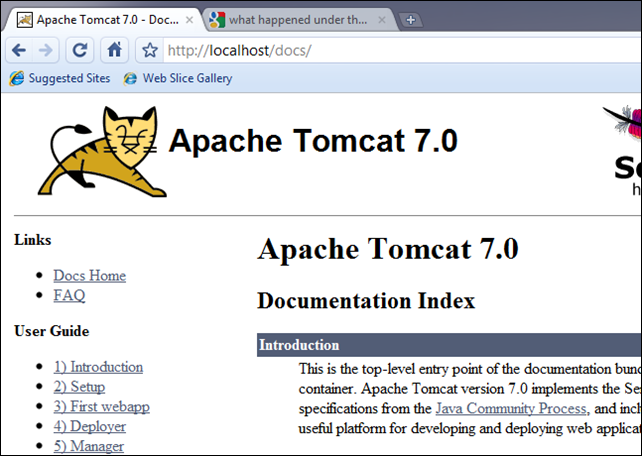
Also the status page.

Here is one link to run the IIS trace which tell the different process to server the request, with or without the filter.
 then you go solr admin, you can run the query.


